Table of Content
Quick Answer
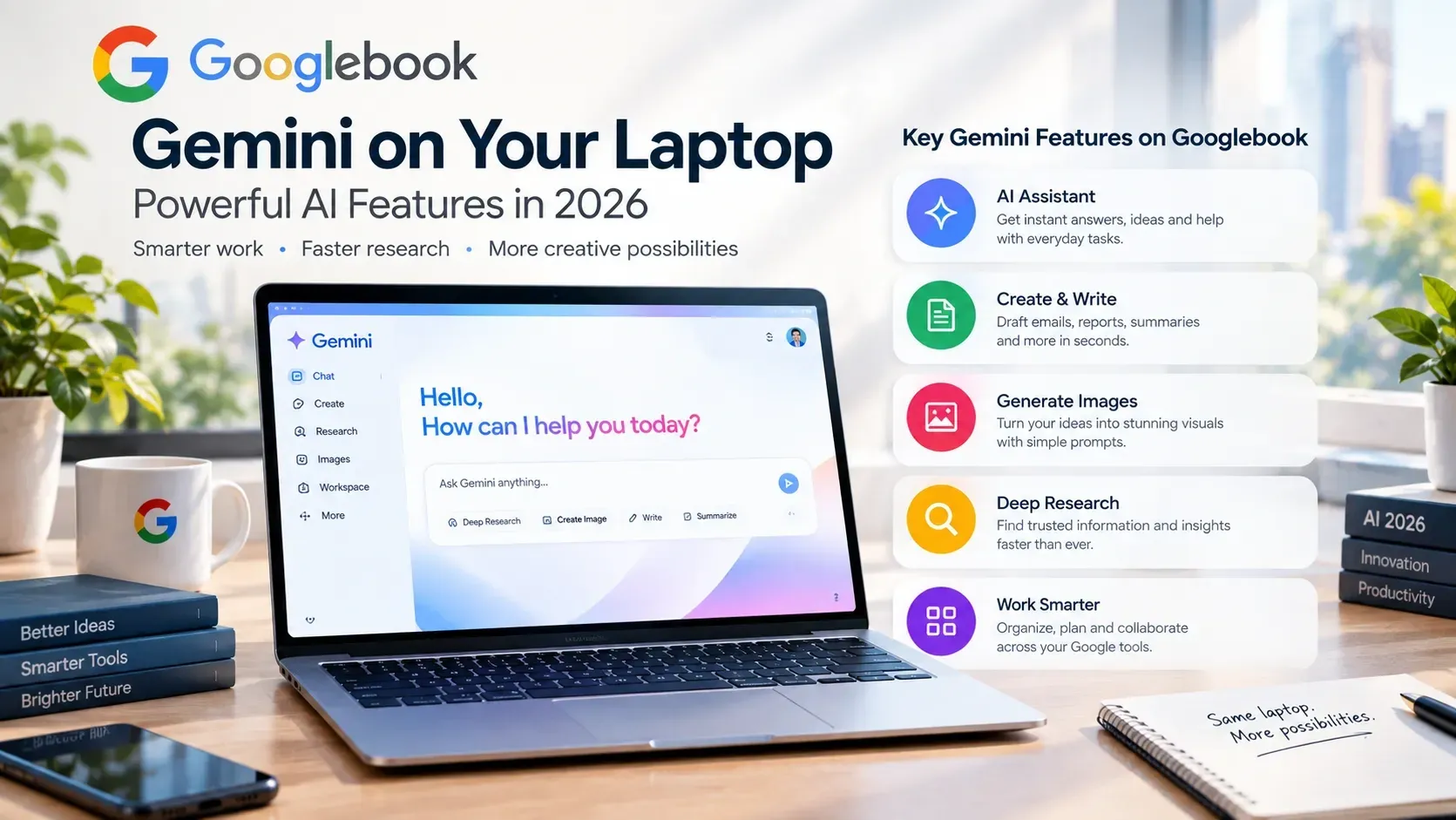
On a Googlebook, Gemini can summarize emails and documents, draft text in your tone, search your files and photos by description, answer questions, and help across apps. Because it is tied into the OS and your Google account, it already knows your context, and thanks to on-device Gemini Nano, some features even work offline. A dedicated Gemini key launches it instantly, and new tools like Magic Pointer and Rambler make the AI feel genuinely built in.
Google is marketing the Googlebook as a Gemini-first laptop, but what does that actually mean once you are using it? It is easy to be sold on buzzwords and then wonder what the AI really does all day. So let us cut through the marketing and look at the practical, real-world Gemini features you will actually use on a Googlebook.
If you are still getting your bearings on the hardware, our Googlebook vs Windows AI PCs guide covers the basics. This article is all about the AI.
The Gemini key: AI one press away
Every Googlebook includes a dedicated Gemini key on the keyboard. Press it and the Gemini assistant appears instantly, ready to answer a question, summarize what is on your screen, or kick off a task. It sounds small, but having AI a single keystroke away changes how you work. You stop thinking of AI as a separate app you open and start treating it as an assistant that is always within reach.
Why it matters
The Gemini key removes friction. The easier AI is to reach, the more you actually use it, and the more useful it becomes.
Magic Pointer: Gemini wherever your cursor is
One of the Googlebook's standout tricks is Magic Pointer. Give your cursor a quick wiggle and Gemini appears right where you are working, understanding the text, images, and context on screen. You can highlight a training plan on a web page and ask Gemini to schedule those runs into Google Calendar, check whether an email looks like spam, or select several images and ask Gemini to combine them. It stays off until you summon it with that wiggle, so it is there when you need it and out of the way when you do not.
Rambler: talk, and get clean text
Rambler is the Googlebook's voice feature, and it is smarter than basic dictation. Speak naturally, even if you ramble or jump between languages mid-sentence, and Rambler turns it into clean, organized text, pulling out action items and tidying the phrasing. The result drops straight into your documents or email. It is a fast way to get thoughts down without worrying about perfect wording.
On-device AI with Gemini Nano
One of the Googlebook's defining features is that it runs Gemini Nano on the device itself, using the laptop's dedicated NPU. This matters for two reasons. First, speed: on-device tasks respond quickly without a round trip to the cloud. Second, offline access: some AI features keep working even when your internet does not, which is a real advantage on a plane or a spotty connection. The heaviest tasks still use the cloud, but having capable AI built into the hardware is a genuine step forward.
What Gemini actually helps with day to day
Here are the everyday tasks where Gemini earns its keep on a Googlebook.
Summarizing
Drowning in a long email thread, a dense PDF, or a wall of text? Ask Gemini to summarize it and get the key points in seconds. This alone can save serious time for students and professionals.
Writing and drafting
Gemini can draft emails, documents, and replies in your tone, then refine them on request. It is like having a writing assistant that never gets tired, whether you are polishing a cover letter or firing off a quick reply.
Smart file search across your stuff
Because Gemini is tied into your Google account, you can search your files, photos, and messages by simply describing what you remember, no exact filenames required. The Files app can even search and open files and photos on a paired phone without transferring them to the laptop first.
Answering questions and helping across apps
From quick facts to help understanding a tricky topic, Gemini acts as a knowledgeable assistant built into the laptop. And instead of copying and pasting between apps, it can work with information across your tools, pulling details and helping you get things done in fewer steps.
| Task | What Gemini does | Who benefits most |
|---|---|---|
| Summarize | Condense emails, docs and articles | Students, professionals |
| Draft | Write and refine text in your tone | Writers, job seekers |
| Search | Find files and photos by description | Everyone |
| Answer | Explain topics and answer questions | Learners, researchers |
| Assist across apps | Move and use info between tools | Busy multitaskers |
Gemini plus your Android phone: the continuity magic
Gemini gets even more powerful when you pair your Googlebook with an Android phone (Android 17 or newer unlocks the full experience). With continuity, your laptop can work with notifications, messages, and more from your phone, so Gemini has even more context to help you. This phone-and-laptop synergy is a big part of what makes the Googlebook feel cohesive, though it is also why iPhone users miss some of the magic.
How Gemini compares to other laptop AI
Gemini is not the only AI assistant on laptops in 2026. Here is the short comparison.
- vs Apple's AI (MacBook): Apple focuses on privacy and tight cross-device integration, while Gemini is more deeply embedded and arguably more capable as an assistant. See our MacBook Air M5 guides.
- vs Microsoft Copilot (Windows AI PCs): Copilot offers local features like Recall and live translation across a huge range of hardware, while Gemini feels more cohesive on a Googlebook.
Gemini on a Googlebook is less of a feature you open and more of an assistant that is simply always there, already aware of your world.
Are the AI features worth it?
Gemini is a big plus if you
- Write, research, or process a lot of information daily
- Live in Gmail, Docs, Drive, and Photos
- Want AI help that is instant and partly offline
- Carry an Android phone for full continuity
If AI is central to how you want to work, Gemini is the Googlebook's killer feature. If you only need a basic laptop for browsing and streaming, a Chromebook Plus may be enough. Still deciding? Our Googlebook vs Windows AI PCs comparison walks you through it.
Frequently Asked Questions
What can Gemini do on a Googlebook?
On a Googlebook, Gemini can summarize emails and documents, draft text in your tone, search your files and photos by description, answer questions, and help across apps. Because it is tied into the OS and your Google account, it already knows your context, and some features run on-device so they work offline.
What is the Gemini key?
The Gemini key is a dedicated keyboard key on every Googlebook that instantly launches the Gemini assistant, so you can ask questions or trigger AI tasks without opening an app.
What are Magic Pointer and Rambler?
Magic Pointer brings Gemini to wherever your cursor is with a quick wiggle, understanding on-screen text and images. Rambler is a voice feature that turns natural, rambling speech into clean, organized text you can drop into docs or email.
Does Gemini work offline on a Googlebook?
Partly. Googlebooks run Gemini Nano on-device, so some AI features work without an internet connection. The most powerful tasks still use the cloud.
Do I need an Android phone for Gemini to work?
No, Gemini works on the laptop itself, but pairing an Android 17 phone unlocks additional continuity features and gives Gemini more context to help you.
Explore more laptop guides: Best Chromebook Plus laptops 2026, Googlebook vs Windows AI PCs, MacBook Air M5 vs M4, and M5 vs M5 Pro vs M5 Max. Shop laptops and accessories from verified Black-owned sellers in our Electronics category.
Want a Gemini-powered laptop?
Compare laptops and accessories from verified Black-owned sellers on Pro Black, and download the app to shop on the go.